Introduction
If you want more local customers to find your business online, learning how to optimize your Google Business Profile should be one of your top priorities.
When people search for services near them, Google often shows local business listings before regular website results.
According to Google, searches containing phrases like “near me” have grown significantly over the years.
Research from BrightLocal also shows that most consumers use Google to find local businesses before making a purchase decision.
The good news is that you do not need a huge marketing budget to improve your visibility.
By taking a few important steps to optimize your Google Business Profile, you can increase your chances of appearing in local search results, attract more customers, and build trust in your community.
Let’s go through the most effective ways to improve your profile.
Steps To Optimize Google Business Profile
1. Claim and Verify Your Business Profile on Google
The first step to optimize google business profile is to claim and verify your business profile.
Verification tells Google that your business is legitimate and that you are the authorized owner of the listing.
Benefits of verification include:
a. Better visibility in local search
b. Access to profile management tools
c. Ability to respond to reviews
d. Access to business insights
Without verification, you will have limited control over your business information.
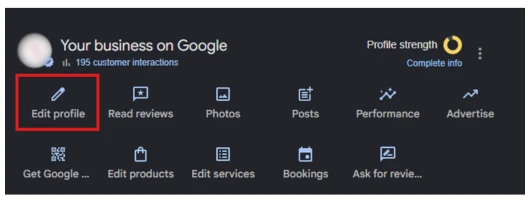
2. Complete Every Section of Your Google Business Profile
Who likes an incomplete profile with no information about your business?
A complete profile gives Google, and most importantly, your visitors sufficient information about your business.
a. Business Name
Always use the real business name that you have registered in your official documents.
Do not add extra keywords to your business name.
For example:
– Smile Bright Dental Clinic – This is an acceptable and legitimate business name
– Smile Bright Dental Clinic | Best Dental Clinic in Indore – This is not a legitimate business name as keyword stuffing is clearly mentioned.
Google can directly suspend this business profile, and it becomes very difficult to recover any suspended Google business profile.
b. Business Categories
Choose the most relevant primary category for your business.
You can also add secondary categories when appropriate.
For example:
a. If you are a dentist, you can choose – Dentist
b. If you run a digital marketing agency, you can choose – Digital Marketing Agency
c. If you provide roof repair services, you can add – Roofing Contractor
Categories help Google understand what services you provide.
c. Business Description
Google offers you a chance to write a business description, wherein you can add your business keywords and take advantage of local search rankings.
You should keep it natural and easy to read.
You can include your business keywords where relevant without overusing them.
Make sure you utilize the complet 750 characters space that Google offers to completely optimize your description.
For example,
ABC Digital Solutions is a trusted digital marketing agency in Hyderabad, helping businesses grow online through SEO, local SEO, website development, content marketing, and Google Business Profile optimization
d. Contact Details (Phone Number)
Always add a working phone number whenever possible.
Make sure it matches the information on your website and other business listings.
Adding a phone number that is not serviceable or often switched off creates trust issues for your business in customers’ minds.
e. Chat Links
Enable messaging features so that customers can reach you directly.
Quick responses often improve customer experience.
f. Website URL (If Available)
Not every local business needs a website, but having a website has its own advantages.
If your business has a website, add your website URL so customers can learn more about your business and services.
A website also provides additional trust signals to Google.
g. Business Address
Local businesses serve local customers, and providing an accurate business address is important for customers to find you and increase foot traffic.
Note: Business Address should be consistent across all platforms.
h. Service Areas
A business can have multiple locations.
If you serve customers in multiple locations, add all relevant service areas.
This helps Google to figure out the locations of your services.
i. Business Hours
Adding correct business hours is very crucial; imagine a customer reaches your local store, sees you are open, and then they find your store is closed. What will be the customer experience?
This is why having correct and accurate business hours is important.
You can also mention some special hours as well.
For example,
If you are a local restaurant, you can add happy hours; this will tell customers that you have some special hours as well.
j. Business Attributes
Adding certain attributes to your business can be useful
Examples include:
a. Wheelchair accessibility for people with certain disabilities
b. Free Wi-Fi
c. Online appointments for salons, healthcare clinics, etc.
d. Women-owned attributes for businesses run solely by women or have a complete women staff/team members
These details can influence customer decisions.
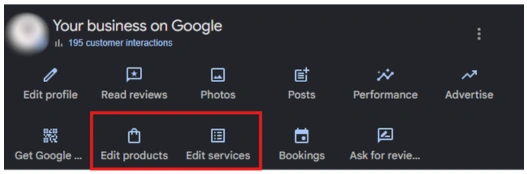
3. Optimize Products and Services
Another effective way to optimize Google Business Profile is by showcasing your products and services.
Google allows businesses to create dedicated product and service listings within their profile.
a. Add High-Quality Product or Service Images
Images make your offerings more attractive and easier to understand.
Use clear and professional high-quality photos that accurately represent your products or services.
b. Add Descriptions Related to Products or Services
Write short descriptions that explain:
- Features
- Benefits
- Use cases
- Customer value
Focus on helping customers understand what you offer.
c. Mention Price
Whenever possible, include pricing information.
Customers appreciate transparency, and pricing can help attract more qualified leads.
4. Upload High-Quality Photos and Videos
This is not something to confuse with products and services.
Google Business Profile has a separate feature that allows you to upload photos and videos of your business.
Google reports that businesses with photos receive more requests for directions and more clicks compared to those without photos.
Consider uploading:
a. Exterior Photos
Adding exterior photos will help your customers understand your business when they reach your business location.
b. Interior Photos
Show the atmosphere and layout of your business.
c. Team Photos
Introduce the people behind the business and build trust.
d. Product Photos
Showcase your products from multiple angles.
e. Before-and-After Photos
These are especially useful for industries like:
- Roofing
- Dentistry
- Home improvement
- Landscaping
Videos can also help demonstrate products, services, or customer experiences.
5. Collect Reviews from Your Customers
One of the most important and not to miss optimization step are customer reviews
Reviews on your Google Business Profile play a major role in local SEO and purchasing decisions.
A profile with consistent positive reviews often performs better in local search results.
Here are a few tactics for getting more reviews:
a. Ask customers after completing a service
b. Send review request emails
c. Share review links through SMS
d. Display QR codes at your location
Equally important is responding to reviews.
When responding:
a. Thank customers for positive feedback
b. Address concerns professionally
c. Stay polite and helpful
A strong review profile is one of the best ways to optimize Google Business Profile for long-term growth.
Note: Reply to all reviews, whether positive or negative. This tells Google that you care about your brand image and make efforts to improve it.
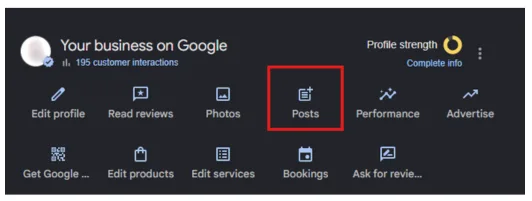
6. Publish Regular Google Business Profile Posts
A lot of businesses set up a profile and then forget about it.
Regular posting shows Google that your business is active.
But the question is, what can you publish?
You can publish the following:
- Company updates
- Promotions
- New services
- Events
- Special offers
Posting consistently helps keep customers informed and engaged.
Even one post per week can make a difference.
7. Add and Optimize the Q&A Section
The Questions & Answers section is often overlooked.
This section allows customers to ask questions directly on your profile.
You can proactively add common questions and answers such as:
a. What services do you offer?
b. What are your business hours?
c. Do you offer free consultations?
d. What payment methods do you accept?
Providing answers upfront helps customers find information quickly and reduces confusion.
You don’t need others to reply to these questions; you can yourself post questions and answer them.
8. Build Local Citations and Maintain NAP Consistency
NAP means Name, Address, and Phone Number
Your NAP information should be identical across all online platforms.
Common citation sources include:
- Business directories
- Industry directories
- Chamber of Commerce websites
- Social media profiles
If your business NAP is inconsistent, which means you have different business information on different platforms, it can cause a negative image of your brand, and your local search rankings can fall.
When you optimize Google Business Profile, make sure every citation matches your profile exactly.
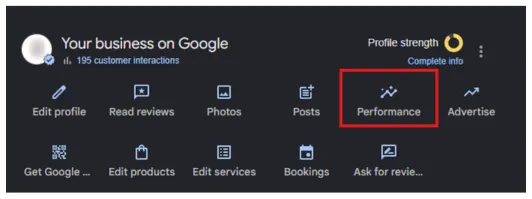
9. Track Performance Using Google Business Profile Insights
Monitoring performance helps you understand what is working and where improvements are needed.
Google Business Profile Insights provides useful data such as:
a. Business Profile Interactions – How many people interacted with your profile?
b. Calls – How many calls have you received from your business profile?
c. Chat clicks – How many people opened the chat box to make a conversation with your business
d. Directions – How many visitors asked for directions to your business location?
e. Website Clicks – How many people visited your website after landing on your Google Business Profile
Pay attention to trends over time.
For example:
a. Are calls increasing?
b. Are more people visiting your website?
c. Are direction requests growing?
These metrics can help you refine your local SEO strategy and continue to optimize Google Business Profile more effectively.
Conclusion
Learning how to optimize Google Business Profile is one of the smartest investments you can make in local SEO.
A well-maintained profile can increase visibility, improve customer trust, generate more leads, and help your business stand out from competitors.
Start by verifying your profile, completing every section, adding products and services, uploading quality photos, collecting reviews, publishing regular updates, and maintaining consistent business information across the web.
Regular updates and monitoring are essential for long-term success.
If you want the best results and do not have the time to manage everything yourself, consider working with a professional Google Business Profile management service provider to keep your profile optimized and competitive.
FAQs
1. How often should I update my Google Business Profile?
You should review your Google Business Profile at least once a month and update it whenever there are changes to your business information.
2. How long does it take to see results after optimization?
Many businesses begin seeing improvements within a few weeks, although competitive industries may take longer.
3. Do Google reviews affect local rankings?
Yes. Reviews help build trust and can influence local search visibility.
4. Is Google Business Profile free?
Yes. Google Business Profile is completely free to create and manage.
5. Can I add multiple service areas?
Yes. Businesses that serve customers across different locations can add multiple service areas.
6. Why is NAP consistency important?
Consistent Name, Address, and Phone Number information helps search engines verify your business and improve local SEO performance.

Subham Kakrania is an organic marketer and web developer specializing in custom SEO strategies that drive measurable business growth. From technical audits to high-converting web design, he helps brands scale their organic visibility, outsmart the competition, and turn search traffic into loyal customers.