Summary
An SEO-friendly website helps search engines find your content, increases organic traffic, and builds long-term credibility without relying solely on paid ads. Top Tips that anyone can implement, including:

* Conduct keyword research based on search intent.
* Improve site structure, page speed, and mobile responsiveness.
* Optimize titles, meta descriptions, URLs, and images.
* Publish high-quality content and earn quality backlinks.
* Ensure technical SEO essentials like HTTPS, XML sitemaps, and schema markup are in place.

SEO is an ongoing process, and consistent improvements lead to better rankings, more traffic, and a stronger user experience over time.
Introduction
Let’s be honest. Having a website that nobody finds is like opening a shop in the middle of a desert.
You can have the best products or the best content in the world, but if search engines can’t find you, none of that matters.
That’s where SEO comes in.
A well-optimized, SEO friendly website brings in more traffic, builds trust with visitors, and helps your business grow without spending a fortune on ads.
The good news? You don’t need to be a tech genius to get started.
These are practical, beginner-friendly tips that anyone can apply, whether you run a blog, an online store, or a small business site.
Here’s what you’ll walk away with: 10 clear, actionable steps to make your site more visible, more useful, and more likely to rank well on Google.
Let’s get into it.
Tips To Make An SEO Friendly Website
1. Do Proper Keyword Research
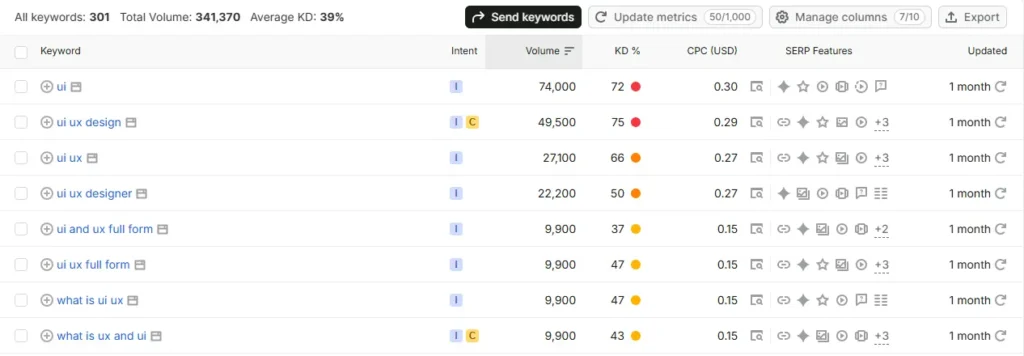
Keyword research is the foundation of any SEO friendly website.
Skip this step, and everything else becomes guesswork.
The key is to focus on search intent, not just search volume.
A keyword might get thousands of searches a month, but if it doesn’t match what your page actually offers, it won’t convert.
Here’s how to approach it:
– Use tools like Google Keyword Planner, Ahrefs, or Ubersuggest to find keyword ideas
– Look for a mix of primary keywords (short and broad) and long-tail keywords (longer and more specific)
– Check what type of content currently ranks for your target keyword before you write
Long-tail keywords usually have less competition and higher intent.
Someone searching “best running shoes for flat feet” is much closer to buying than someone searching “shoes.”
2. Optimize Your Site Structure & Navigation
Search engines love websites that are easy to crawl. Visitors do too.
A flat, logical structure works best.
Think of it like a simple path: Home > Category > Page.
Avoid burying important pages five clicks deep.
A few things that help:
– Clear internal linking between related pages
– Breadcrumbs, so users (and search engines) always know where they are
– A simple main menu with no more than 6 to 8 items
Good structure isn’t just about SEO.
It reduces bounce rate because visitors can actually find what they came for.
3. Write SEO-Friendly Title Tags & Meta Descriptions
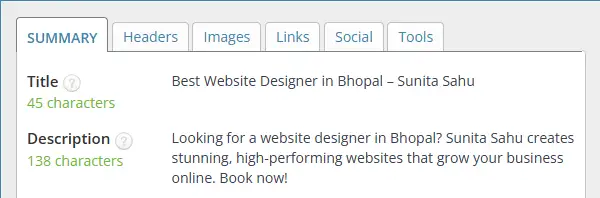
Your title tag and meta description are often the first thing people see in search results.
They matter more than most site owners realize.
A few quick rules:
– Keep title tags under about 60 characters
– Keep meta descriptions under about 155 characters
– Include your target keyword naturally; don’t force it
– Write for humans first; make it compelling enough to earn the click
Think of your meta description as a mini ad for your page.
It won’t directly boost rankings, but it strongly influences click-through rate, which does impact your visibility over time.
4. Improve Page Load Speed
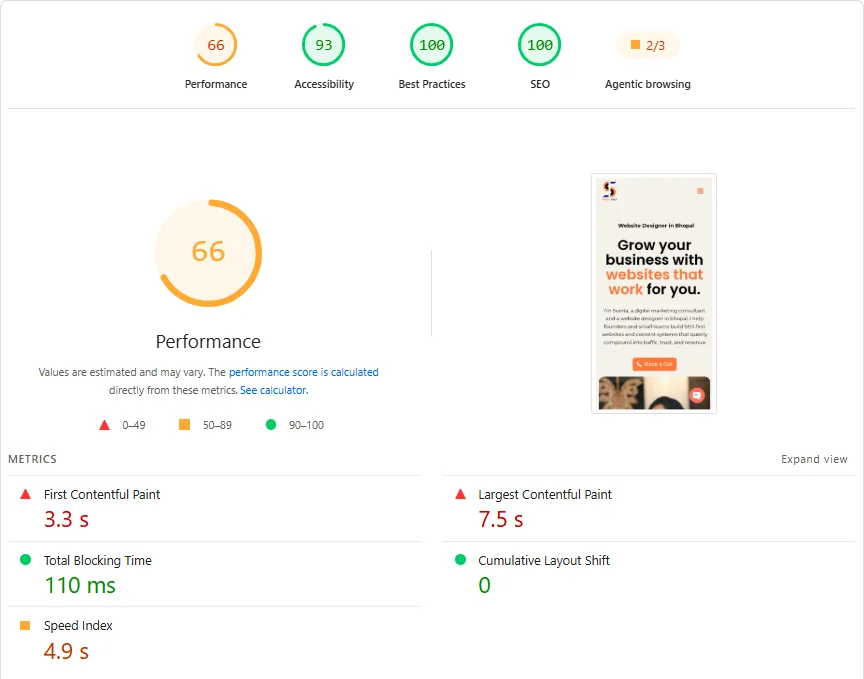
Page speed is one of the most overlooked aspects of building an SEO-friendly website.
According to Google, as page load time goes from 1 second to 3 seconds, the probability of a visitor bouncing increases by 32%.
That’s a huge chunk of potential traffic lost before your content even loads.
Here’s how to speed things up:
– Compress images before uploading them
– Use lazy loading so images load only when needed
– Minimize CSS and JavaScript files
– Turn on browser caching
Tools like Google PageSpeed Insights and GTmetrix will show you exactly what’s slowing your site down, along with specific fixes.
5. Make Your Website Mobile-Friendly
More than half of all web traffic now comes from mobile devices.
If your site isn’t built for mobile, you’re losing a large chunk of potential visitors and rankings.
Google uses mobile-first indexing.
That means it primarily looks at the mobile version of your site when deciding how to rank you, not the desktop version.
To check where you stand:
– Use Google’s Mobile-Friendly Test tool
– Make sure text is readable without zooming
– Confirm buttons and links are easy to tap
– Test load speed specifically on mobile
Responsive design isn’t optional anymore. It’s the baseline expectation.
6. Use Clean, Descriptive URLs
URLs seem small, but they matter more than people think.
A clean URL is short, readable, and includes relevant keywords where appropriate.
Compare these two:
– yoursite.com/p=12345&cat=8
– yoursite.com/seo-friendly-website-tips
The second one is easier to read, easier to remember, and gives both users and search engines a clear idea of what the page is about.
Try to avoid unnecessary parameters, numbers, or special characters in your URLs whenever possible.
7. Optimize Images for SEO
Images make your site more engaging, but unoptimized images can quietly hurt your SEO and slow your load speed.
A few simple fixes:
– Use descriptive file names instead of generic ones like IMG1234.jpg
– Add alt text that describes the image clearly
– Compress file sizes without sacrificing too much quality
– Use modern formats like WebP instead of large PNG or JPEG files
Alt text also helps with accessibility, which is a nice bonus for making your site usable for everyone.
8. Create High-Quality, Original Content
At the end of the day, content is what keeps people on your site and brings them back.
Good content solves a real problem or answers a real question your audience has.
It’s not written just to please search engines; it’s written to genuinely help someone.
A few tips to keep in mind:
– Use headers (H1 to H3) to break up content and make it scannable
– Write in a clear, simple way; don’t overcomplicate things
– Update old posts regularly instead of letting them go stale
Fresh, useful content signals to search engines that your site is active and worth ranking.
9. Build Quality Backlinks
Backlinks are still one of the strongest ranking factors.
But not all backlinks are equal.
A few links from relevant, trustworthy sites will do far more for your rankings than a hundred low-quality, spammy ones.
Ways to build backlinks the right way:
– Write guest posts for reputable sites in your niche
– Build genuine partnerships with other businesses or bloggers
– Get featured through digital PR or expert roundups
Avoid link schemes or paid link farms.
Google’s Penguin algorithm update is very good at catching these, and the penalty usually isn’t worth the short-term boost.
10. Ensure Technical SEO Basics Are Covered
Technical SEO is the part most people skip, but it can quietly make or break your rankings.
Here’s your basic checklist:
– Make sure your site has an SSL certificate (HTTPS, not HTTP)
– Submit an XML sitemap and set up a proper robots.txt file
– Regularly check for and fix broken links or crawl errors
– Add structured data or schema markup where relevant
These fixes aren’t glamorous, but they’re the backbone of a well-functioning, SEO friendly website.
Without them, even great content can struggle to rank.
Conclusion
Building an SEO friendly website isn’t a one-time task.
It’s an ongoing process that improves over time as you keep refining and updating your site.
You don’t have to tackle all 10 tips today.
Start with two or three- maybe keyword research, page speed, and mobile-friendliness- and build from there.
Once those feel solid, move on to the next set.
Small, consistent improvements add up.
Over a few months, you’ll likely notice better rankings, more organic traffic, and a site that simply works better for the people visiting it.
If you’d like a free checklist version of this guide, or a quick audit of your current site, feel free to reach out.
Sometimes a fresh set of eyes catches things you’ve been too close to see.
Frequently Asked Questions
1. How long does it take to see SEO results after optimizing a website?
Typically 3-6 months for noticeable improvements, though this varies based on competition, site age, and consistency of effort. SEO is a long-term strategy, not an instant fix.
2. Do I need to hire an SEO expert, or can I do it myself?
Basic SEO (like the tips in this post) can be handled by site owners themselves, especially with tools like Yoast SEO or Rank Math. However, competitive niches or technical issues may benefit from professional help.
3. What’s the difference between on-page and technical SEO?
On-page SEO refers to content and elements visible to users (titles, headers, content quality), while technical SEO focuses on backend factors like site speed, crawlability, and structured data that help search engines index your site properly.
4. Does having a blog help with SEO?
Yes. Regularly publishing relevant, keyword-optimized content signals to search engines that your site is active and authoritative, and it creates more opportunities to rank for various search queries
5. How important are backlinks compared to on-page SEO?
Both matter, but they serve different purposes. On-page SEO helps search engines understand your content, while backlinks build authority and trust. A strong SEO strategy needs both working together.
6. Can I make my website SEO-friendly without coding knowledge?
Absolutely. Most modern CMS platforms (WordPress, Wix, Shopify) offer built-in SEO tools and plugins that handle much of the technical work, letting you focus on content and keywords without touching code.

Subham Kakrania is an organic marketer and web developer specializing in custom SEO strategies that drive measurable business growth. From technical audits to high-converting web design, he helps brands scale their organic visibility, outsmart the competition, and turn search traffic into loyal customers.