

Key Takeaways

1. Conduct keyword research focusing on high-intent and long-tail keywords.
2. Build a simple, SEO-friendly website architecture.
3. Optimize product pages with unique titles, descriptions, images, and reviews.
4. Optimize category pages for broader commercial keywords.
5. Improve technical SEO through sitemap submission, canonical tags, and crawlability.
6. Improve website speed and Core Web Vitals.
7. Ensure the website is mobile-friendly and responsive.
8. Implement Product Schema Markup for enhanced search visibility.
9. Build content, internal links, and high-quality backlinks to establish topical authority.
10. Track organic traffic, rankings, conversions, and revenue to continuously improve performance.
Running a successful e-commerce website can feel like opening a shop on a quiet street. If people cannot find your store, you won’t make sales. That is where search engine optimization comes in. Getting free, high-quality traffic to your e-commerce website is one of the best ways to grow your business online. Research shows that over 44% of online shoppers begin their buying journey with a search engine query.
On top of that, organic search drives more than 33% of total revenue across retail stores.In this guide, you will learn practical steps to rank higher on Google, attract shoppers who are ready to buy, and grow your sales without spending all your money on ads.
Why Is SEO Important for an E-Commerce Website?
Paid ads can bring quick traffic, but the moment you stop paying, the traffic stops.
Search engine optimization works differently.
It builds a steady stream of buyers over time.
- Increase organic website traffic: Ranking on the first page brings a constant flow of visitors to your store every day.
- Target high-intent buyers: People searching for specific products are often ready to buy right away.
- Reduce advertising costs: Building organic search visibility lowers your dependency on expensive Facebook or Google ads.
- Build customer trust: Shoppers trust organic search results more than sponsored ads.
- Better long-term ROI: An optimized store continues to generate sales long after the initial work is done.
How To Do SEO For An E-Commerce Website? (Step-by-Step Guide)
1. Conduct E-Commerce Keyword Research
Keyword research is the foundation of any successful strategy.
You need to know what words shoppers type into Google when looking for your products.
Focus on finding keywords with commercial intent.
For example, instead of targeting “shoes,” aim for specific phrases like “waterproof running shoes for men.”
- Find transactional keywords: Look for terms containing words like “buy,” “best deal,” “discount,” or specific product names.
- Use long-tail keywords: Longer search terms have lower search volume, but they convert much higher because the buyer knows exactly what they want.
- Check your competitors: See what keywords your top competitors rank for and target those same topics.
- Map keywords correctly: Assign one primary keyword to each product and category page on your site to avoid keyword cannibalization.
2. Optimize Your E-Commerce Website Structure
The layout of your store matters for both visitors and search engines.
A clean structure helps search engines index your pages faster and lets customers find products in just a few clicks.
Keep your site hierarchy shallow.
A good rule of thumb is that any product should be reachable within three clicks from the homepage.
Homepage -> Category Page -> Subcategory Page -> Product Page
Also, use clean URLs.
A clear URL like yourstore.com/shoes/running-shoes works much better than yourstore.com/item?id=12345.
Always add breadcrumbs on product pages so users can easily jump back to parent categories.
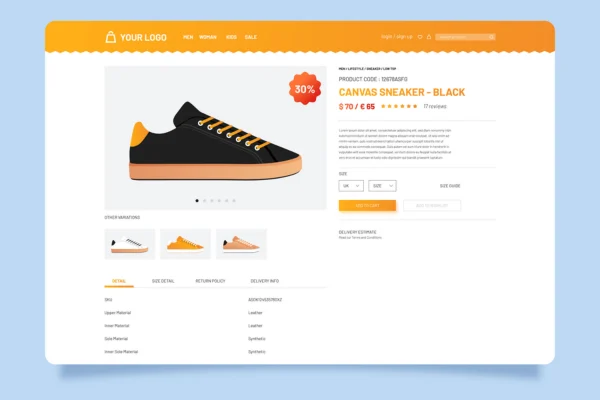
3. Optimize Product Pages for SEO
Your product pages are where the sales happen.
Optimizing them helps Google understand what you are selling while convincing visitors to buy.
- Write unique titles: Include your main keyword and brand name naturally in the page title.
- Create helpful product descriptions: Avoid copying text from manufacturers. Write original, engaging descriptions that highlight product features and benefits.
- Optimize product images: Use clear images and add descriptive alt text so Google Image Search can index them properly.
- Collect reviews: Show real customer ratings and written reviews. Reviews provide fresh content that search engines love.
4. Optimize Category Pages
Category pages are powerful because they can rank for broad search terms that bring in large volumes of traffic.
To optimize category pages, write a short descriptive intro at the top or bottom of the page.
Include your main category keyword naturally in the title tag, meta description, and heading.
Make sure your product filters work smoothly without creating thousands of duplicate pages for search engines to crawl.
5. Optimize Title Tags and Meta Descriptions
Title tags and meta descriptions appear directly in Google search results.
They tell shoppers what your page is about and encourage them to click.
Keep title tags under 60 characters and meta descriptions under 160 characters.
Add primary keywords near the beginning.
Title Example: Men's Leather Boots | Waterproof Work Boots | Brand Name
6. Improve E-Commerce Website Technical SEO
Technical issues can stop search engines from reading and ranking your pages.
Keeping your store technically sound ensures your effort pays off.
- Submit an XML sitemap: Use Google Search Console to submit a complete sitemap of your categories and products.
- Use canonical tags: Add canonical links to prevent duplicate content problems caused by product variations like colors or sizes.
- Fix broken links: Use audit tools regularly to find and fix 404 errors or improper redirects.
- Check robots.txt: Make sure important store sections are open for search engine bots to crawl.
7. Improve Website Speed and Core Web Vitals
Slow-loading pages frustrate shoppers and harm your rankings.
Studies show that a one-second delay in page load time can reduce overall conversion rates by up to 7%.
Compress all product photos before uploading them to save file space.
Minify your HTML, CSS, and JavaScript files, and use a Content Delivery Network (CDN) like Cloudflare to serve images quickly across the globe.

8. Make Your E-Commerce Website Mobile-Friendly
More than 60% of online shopping orders now happen on smartphones and tablets.
Google uses mobile-first indexing, meaning it ranks your site based on its mobile version.
This is why having a mobile-friendly website matters for your business.
Use a fully responsive website design that adjusts cleanly to any screen size.
Make buttons large enough to tap easily, keep checkout forms simple, and test mobile usability regularly using mobile testing tools.

9. Implement Product Schema Markup
Schema markup is code added to your pages that helps search engines understand details like price, stock availability, and review ratings.
When you add schema markup, Google can show rich snippets in search results.
Rich snippets display star ratings, product prices, and stock status right below your page link, which increases click-through rates.
10. Create High-Quality Content for Your E-Commerce Website
A blog attached to your store is a great way to attract buyers who are still researching what to purchase.
Publish detailed buying guides, product comparison articles, and seasonal shopping lists.
For example, an online coffee store could write a blog post titled “How to Choose the Best Espresso Machine for Home.”
Linking from your blog posts back to relevant product pages builds topical authority and guides readers toward making a purchase.
11. Optimize Internal Linking
Internal links connect your pages and help pass authority throughout your online store.
Link from high-traffic blog posts to relevant product categories.
Also, display recommended or related products at the bottom of every product page.
Use natural anchor text containing relevant descriptive keywords instead of generic phrases like “click here.”
12. Build High-Quality Backlinks
Backlinks from reputable websites signal to Google that your store is trusted and popular.
- Reach out to bloggers: Send product samples to reviewers in your niche for honest feature reviews and links.
- Use digital PR: Create interesting data reports or trend guides that journalists want to reference in news stories.
- Fix broken links: Find broken resource links on industry websites and offer your product or guide as a replacement.
- Avoid spam: Never buy low-quality automated links. They can lead to severe Google penalties.
13. Optimize Images for E-Commerce SEO
Product images make up a big portion of your store page sizes.
Optimizing photos keeps your pages fast and opens up traffic from Google Images.
Name image files using clear, descriptive words instead of default names like IMG_001.jpg.
Convert older image formats into modern web formats like WebP or AVIF, and turn on lazy loading so photos load only when users scroll down to them.
14. Optimize E-Commerce SEO for User Experience
Search engines track how users interact with your pages.
If visitors leave your store quickly, your rankings can fall.
Provide smooth site search with clear filters for size, color, and price.
Keep your navigation menus clean and simple.
Make shipping, return policies, and customer support links easy to locate to reduce shopping cart abandonment.
15. Track and Measure E-Commerce SEO Performance
Tracking your data helps you understand what strategies work best for your online store.
Set up Google Analytics 4 (GA4) and Google Search Console.
Pay attention to organic traffic trends, keyword positions, conversion rates, click-through rates, and total sales driven by search engines.
Reviewing these metrics monthly allows you to adjust your focus toward your highest-performing pages.
Best E-Commerce SEO Tools
Using the right tools makes running site audits and keyword research much easier.
| SEO Tool | Primary Use |
|---|---|
| Google Search Console | Track rankings, organic clicks, indexation, and technical errors. |
| Google Analytics 4 | Measure traffic sources, visitor behavior, and revenue metrics. |
| Ahrefs | In-depth keyword research, competitor analysis, and backlink tracking. |
| Semrush | Competitor audits, rank tracking, and paid advertising research. |
| Screaming Frog | Deep technical site crawls to spot broken links and duplicate pages. |
| Google PageSpeed Insights | Test site performance and monitor Core Web Vitals metrics. |
| Google Keyword Planner | Discover buyer keywords directly from Google search data. |
| Rich Results Test | Validate product schema markup and structured data code. |
Common E-Commerce SEO Mistakes to Avoid
Avoid these frequent mistakes that can lower your organic rankings:
- Using manufacturer descriptions: Copying text used by hundreds of other stores causes duplicate content issues.
- Ignoring category pages: Focus on category SEO just as much as individual product pages.
- Targeting keywords that are too broad: Focus on high-intent keywords rather than general terms that rarely convert.
- Allowing bad site structure: Avoid deep navigation menus that require too many clicks to find products.
- Overlooking mobile optimization: Ensure your checkout process works smoothly on small mobile screens.
- Skipping performance tracking: Track your results so you know which changes build revenue.
Conclusion
Building steady organic traffic for an e-commerce website takes time and regular effort, but the long-term payoff is huge.
By targeting high-intent keywords, organizing your store structure, improving site speed, and creating great product content, you can attract ready-to-buy shoppers day after day.
Consistency is key.
Focus on making incremental updates to your product and category pages every week.
Need help scaling your store’s search performance?
Partnering with an experienced professional like Sunita Sahu for e-commerce SEO services can accelerate your growth and help you outperform your competitors.
Start auditing your store today to uncover your biggest opportunities!
Frequently Asked Questions
1. How long does SEO take for an e-commerce website?
Most online stores start seeing initial results within 3 to 6 months. However, competitive niches can take 6 to 12 months of consistent effort to achieve top search engine rankings.
2. Is blogging necessary for an e-commerce website?
Blogging is not mandatory, but it helps significantly. Writing helpful buying guides allows you to target informational keywords, educate buyers, and build internal links to your product pages.
3. How do I handle out-of-stock products for SEO?
Keep out-of-stock product pages live if the item will return soon. Add an email notification form for restocks. If the item is permanently discontinued, redirect the URL to a closely related product or category page using a 301 redirect.
4. Should I use paid ads alongside e-commerce SEO?
Yes, using paid ads together with search optimization works well. Paid ads deliver quick sales, while organic optimization builds steady, long-term traffic with lower overall acquisition costs over time.

Subham Kakrania is an organic marketer and web developer specializing in custom SEO strategies that drive measurable business growth. From technical audits to high-converting web design, he helps brands scale their organic visibility, outsmart the competition, and turn search traffic into loyal customers.